TanStack Router Data Loading
How TanStack Router runs beforeLoad and loader functions, what data each one can see, and where slow route work belongs.
Ben Houston • • 3 min read
TanStack Router gives routes two places to prepare data: beforeLoad and loader. Use beforeLoad to build shared route context. Use loader to fetch data for the route that owns it.
Execution Environment#
With TanStack Router alone, beforeLoad and loader run on the client. With TanStack Start, they may run on the client or the server, so write them with code that works in both environments.
Do not call browser-only APIs or Node-only APIs from these functions unless you have checked the runtime. For database access, file system work, and other server-only code, use TanStack Start server functions.
Order of Execution#
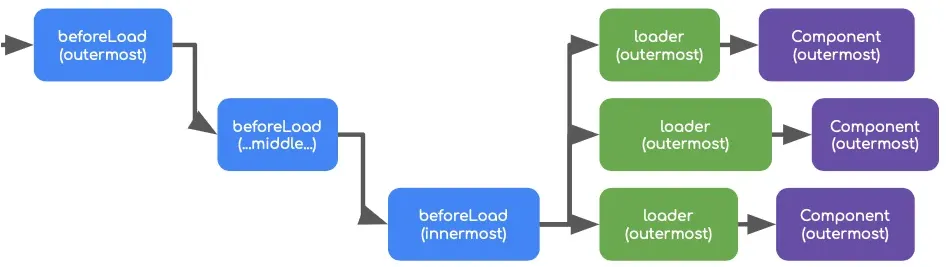
- beforeLoad functions run sequentially from outermost to innermost route
- loader functions run in parallel, but only after all beforeLoad functions complete
This execution order gives you three constraints:
- Parent route data is available to child routes
- All loaders can access beforeLoad data
- Loaders cannot access data from other loaders
Data Access and Flow#
beforeLoad Data#
- Each
beforeLoadreceives:{ params, search, context } contextcontains merged results from all parent routes' beforeLoad functions- Each beforeLoad's return value is merged into this context
- Child routes receive the context built by their parents
loader Data#
- Each
loaderreceives:{ params, context } - To access
{ search }, defineloaderDeps contextmade available to loader contains the complete merged result from all beforeLoad functions- Each loader's return is independent and isolated from other routes' loaders
- Loader results are not merged or shared between routes
Accessing Data in Components#
export const Route = createFileRoute('/example')({
  component: () => {
    const routeContext = Route.useRouteContext();
    const loaderData = Route.useLoaderData();

    return <YourComponent />;
  },
});
Complete Example#
const testServerFn = createServerFn({ method: 'GET' })
  .validator((data: unknown) => data as string)
  .handler(async ({ data }) => {
    return 'Received: ' + data;
  });

export const Route = createFileRoute('/index')({
  component: () => {
    const routeContext = Route.useRouteContext();
    // Will output: { customData: 'hello world from beforeLoad!' }

    const loaderData = Route.useLoaderData();
    // Will output: { customData: 'hello world from loader!' }

    return <div>Route Loaders Test</div>;
  },

  beforeLoad: async ({ context, params, search }) => {
    const parentData = context;
    const serverResponse = await testServerFn('beforeLoad');

    return {
      customData: 'hello world from beforeLoad!',
    };
  },

  loader: async ({ context, params }) => {
    const beforeLoadData = context;
    const serverResponse = await testServerFn('loader');

    return {
      customData: 'hello world from loader!',
    };
  },
});
Why Slow beforeLoad Functions Hurt More#
beforeLoad#
- Runs sequentially, so a slow function blocks everything downstream
- A slow parent route
beforeLoaddelays its child routes - Best for critical, lightweight operations needed by multiple nested routes
loader#
- Runs in parallel, so it does not block other loaders
- A slow
loaderonly affects its specific nested route - Ideal for heavier, route-specific data fetching
Handling Nested Routes#
To prevent property collisions in merged beforeLoad data, use namespaced objects:
// Parent route
beforeLoad: async () => {
  return {
    user: { id: 123, name: 'John' },
  };
};

// Child route
beforeLoad: async ({ context }) => {
  return {
    settings: { theme: 'dark' },
  };
};
Practical Guidance#
Use beforeLoad for authentication checks and data that multiple nested routes need. Use loader for route-specific fetching. Loaders run in parallel, so a slow one only delays its own route.
Keep beforeLoad lean. A slow beforeLoad blocks all downstream loaders. Cache expensive results if you call the same endpoint across routes.
In deeply nested route trees, use namespaced objects in beforeLoad returns to avoid property collisions. TypeScript will infer context types through the chain if you return typed objects.