Passwordless Login System
Passwords are a shared-secret liability. Here is how to build a modern passwordless auth flow using Email OTP and Passkeys (WebAuthn), without storing passwords.
Ben Houston • • 4 min read
This is a write-up of my March 26, 2026 talk at ForwardJS.
Passwords have been a mess for a long time. People either reuse weak passwords, or they offload complexity to password managers and still end up with account recovery friction. At a system-design level, passwords are also a shared secret, so a leak at either end is catastrophic.
Why Passwordless?#
Passwords are expensive and fragile:
- They create a high-value breach target, even when hashed.
- Users routinely choose convenience over security.
- Traditional 2FA flows are bolted on and add friction without improving the threat model.
Establishing Identity First: Email OTP#
In any user system you still need to establish identity when an account is created. The flow I use is:
- Collect username + email.
- Send an OTP to the email address.
- Verify OTP to confirm account ownership.
- Register a passkey on the confirmed account.
For OTP login flows, I recommend an 8-character alphanumeric code plus strong rate limiting. You get a large key space and practical usability.
What Passkeys Are (Mental Model)#
The easiest mental model is SSH key auth in your browser:
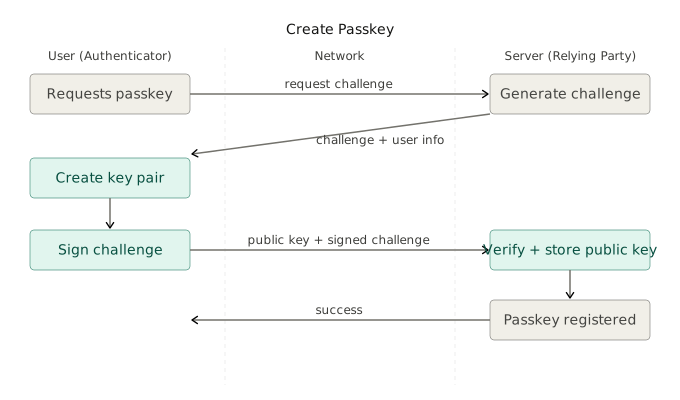
- A passkey registration creates a private/public key pair.
- The private key stays on the user device.
- The server stores only public-key material.
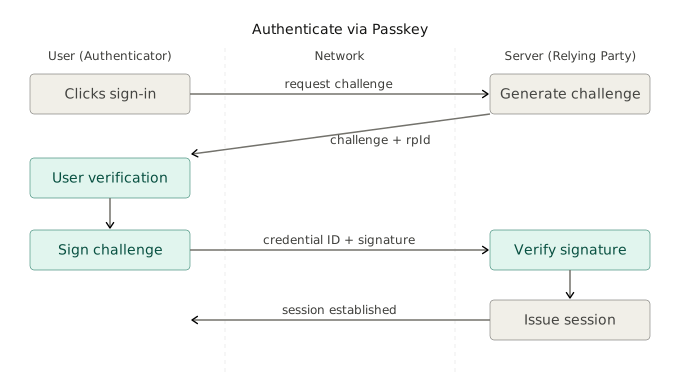
- Authentication is challenge/response signing, verified server-side.
Passkeys are scoped to your relying party identity (rpId) and supported across modern browsers and devices.

Browser API Surface#
At the browser layer, it is basically two calls:
navigator.credentials.create()for registrationnavigator.credentials.get()for authentication
Registration example:
const credential = await navigator.credentials.create({
  publicKey: {
    challenge,
    rp: { id: 'example.com', name: 'Example App' },
    user: { id: userId, name: '[email protected]', displayName: 'Alice' },
    pubKeyCredParams: [{ alg: -257, type: 'public-key' }],
    authenticatorSelection: {
      residentKey: 'required',
      userVerification: 'preferred',
    },
  },
});
Authentication example:
const assertion = await navigator.credentials.get({
  publicKey: {
    challenge,
    rpId: 'example.com',
    allowCredentials: [{ id: credentialId, type: 'public-key' }],
    userVerification: 'preferred',
  },
});
Two practical notes:
rpIdcan be broad (example.com) or host-specific (app.example.com) depending on your product boundary.rpId: 'localhost'is treated as a secure context for local development.
Server-Side Verification (SimpleWebAuthn)#
The browser APIs are straightforward, but server-side verification is where most teams can make mistakes. In the demo, I use SimpleWebAuthn to handle the heavy lifting safely:
- Decode and validate WebAuthn payload formats.
- Re-validate challenge, origin, and
rpIdbindings. - Verify signatures against stored credential public keys.
- Support modern crypto algorithms with solid TypeScript ergonomics.
You could hand-roll the verification logic, but the attack surface is large enough that a well-tested library is the right call.
Advanced WebAuthn Options You Might Need#
Most apps can stay with defaults, but these options matter when your security posture gets stricter:
authenticatorAttachmentfor platform vs roaming key preference.userVerificationto require biometrics/PIN more aggressively.signCountfor some cloned-credential detection scenarios.attestationwhen hardware provenance policies matter.
Demo Implementation Stack#
I made a full passwordless demo user system here based on this tech stack:
- TanStack Start + Router
- React + TypeScript
- Tailwind CSS + shadcn/ui
- SimpleWebAuthn browser/server packages
- SQLite + Drizzle ORM
If you want to clone and run it locally, setup steps are documented in the repo README:
Wrap-Up#
New products should ship passwordless auth. Email OTP establishes account identity; passkeys handle every subsequent login; all cryptographic verification stays server-side and well-tested. The pieces are stable, the libraries are mature, and the user experience is better than anything password-based.